
How Small Can a QR Code Be?
There is no minimum size for a QR code as such. There is a minimum size for one module — the smallest square in the grid — and everything else follows from how many modules your message needs.
The unit that matters
Ask "how small can a QR code be" and the honest answer is a question back: how many modules does it have? A 21×21 version 1 code and a 57×57 version 10 code printed at the same width are not the same problem at all. The second has modules less than half as wide, and it is module width that a camera either resolves or does not.
So the chain is: message length and error-correction level decide the version; the version decides the module count; the module count plus the minimum module size decides the printed width. Work it in that order and the answer stops being guesswork.
What we measured: five pixels per module
We generated the same code at a range of resolutions and put each one through a simulated camera — a fixed optical blur, sensor noise, and a small perspective error, repeated 40 times per setting with different noise seeds.
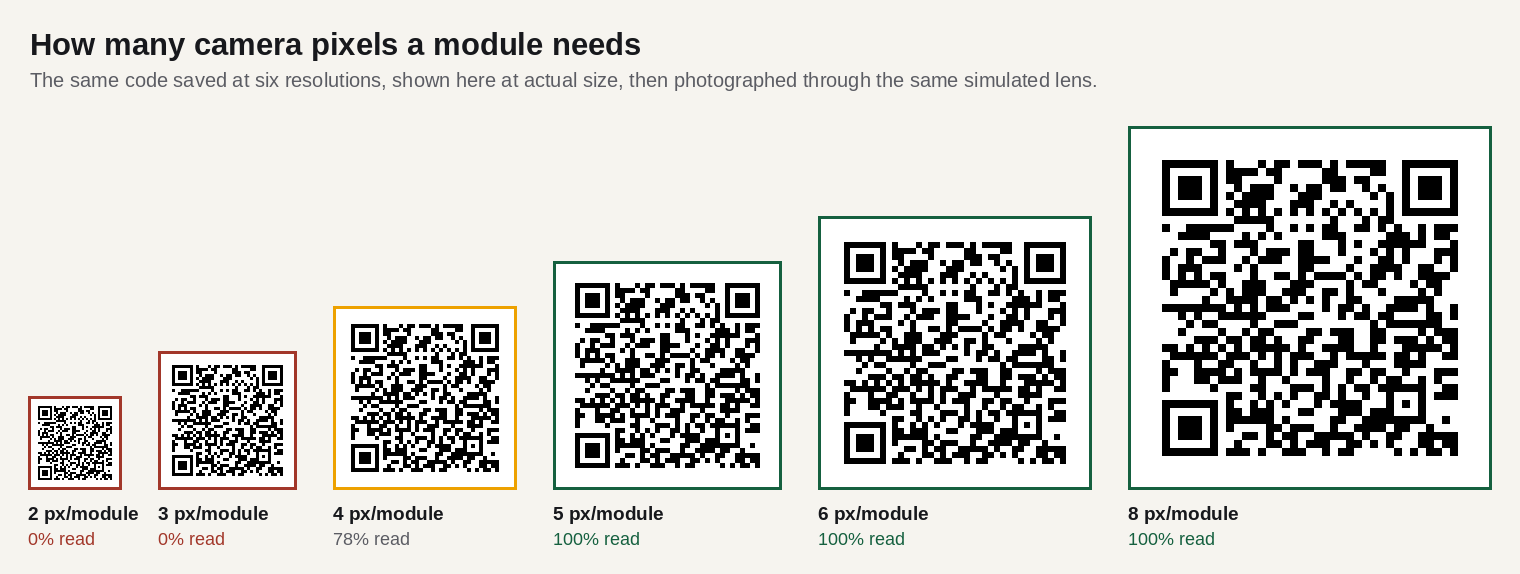
Five pixels per module is the number worth remembering. It is not a property of QR codes; it is roughly what any sampling system needs to recover a square wave with confidence once blur and noise are in play. Different decoders will move it by a pixel in either direction.
From pixels to millimetres
To turn that into physical size, you need to know how many pixels of camera land on each millimetre of paper.
Take an ordinary phone main camera: about 4,000 pixels across the frame and a horizontal field of view near 65°. At a distance d, the frame is about 1.27 × d wide. Held 30 cm away, that is a frame roughly 38 cm across, so about 10.5 pixels land on every millimetre.
Five pixels per module then means a module of about 0.48 mm at that distance. For a 29×29 code, that is a symbol about 14 mm wide, plus the quiet zone.
Why the usual rule is three times more cautious
The rule of thumb everyone quotes is 10:1 — the code should be a tenth as wide as the distance it is read from. At 30 cm that demands a 30 mm code, more than twice what the pixel arithmetic above allows.
The gap is not an error. The 10:1 rule is buying margin for everything the arithmetic ignores:
- Focus. A phone hunting for focus spends a moment producing exactly the blurred frames that break decoding. Our tests found that a blur of about a third of a module wide is enough to stop a code reading.
- Motion. Nobody holds a phone still, and a hand-held frame at low light has real motion blur.
- Framing. The code has to be found, not just resolved. A symbol occupying 3% of the frame is a much harder detection problem than one occupying 30%.
- The camera you don't control. Older phones, front cameras, scratched lenses, dirty screens.
So: use 10:1 for anything you are printing and cannot re-print. Use the arithmetic when you need to argue with a designer about whether 12 mm can possibly work — it can, in a controlled setting, and it will fail in a car park.
Practical minimums
| Where it lives | Read from | Minimum width | Comfortable |
|---|---|---|---|
| Business card | 20 cm | 20 mm | 25 mm |
| Product label | 20 cm | 20 mm | 25 mm |
| Restaurant table card | 30 cm | 30 mm | 40 mm |
| A5 flyer | 30 cm | 30 mm | 40 mm |
| Shop window | 1 m | 100 mm | 130 mm |
| Estate agent board | 3 m | 300 mm | 400 mm |
| Roadside sign | 10 m | 1 m | 1.3 m |
Two corrections people forget. The quiet zone is outside these numbers: a 20 mm symbol needs 20 mm of clear space plus four modules of margin all round, so budget about 25 mm of layout. And the distance that matters is the distance someone will actually stand at, not the one in the design brief — people walk up to a poster to scan it, and nobody climbs a lamp post.
Shrink the payload, not the code
If a code is too big for the space, the productive move is almost never to shrink the square. It is to reduce how many modules the square has to contain.
- Shorten the URL. A 90-character tracking URL at level M needs a 41×41 grid. The same page behind a 25-character link needs 29×29 — 30% fewer modules across, which is 30% more width per module at the same printed size.
- Drop the tracking parameters.
?utm_source=&utm_medium=&utm_campaign=can easily double a URL's length. Put the campaign in the path instead. - Skip
https://only if you must. It saves eight characters but some older scanners will not add the scheme back. Usually not worth it. - Use uppercase for alphanumeric payloads. QR's alphanumeric mode packs uppercase letters, digits and a few symbols nearly twice as tightly as byte mode — but it has no lowercase, so it only helps for codes, references and plate numbers, not URLs.
- Drop the error-correction level if the code lives somewhere clean. Going from H to M on a 53-character URL takes the grid from 41×41 down to 33×33.
How the payload maps to grid size is set out in how much data fits in a QR code, and the size-versus-damage trade in error correction explained.
Written by Manuel Llovet, who builds and maintains QR Code Free Forever. Published 2026-08-31, last checked 2026-09-08. Figures and measurements on this page were produced for this site; the method is described in each caption.