
QR Code Error Correction Explained
Every QR code carries a spare copy of itself. The level you pick decides how much of the code can be destroyed before the spare runs out — and, as it turns out, where the damage lands matters more than how much of it there is.
What the four letters mean
A QR code does not just store your data. It stores your data plus a block of Reed–Solomon check symbols, computed from the data, that let a scanner rebuild bytes it could not read. The error-correction level decides how big that block is.
| Level | Recovers about | Typical use |
|---|---|---|
| L | 7% of codewords | Screens, clean printing, long payloads |
| M | 15% of codewords | The sensible default for print |
| Q | 25% of codewords | Codes that will be handled, or carry a logo |
| H | 30% of codewords | Packaging, outdoors, fabric, anything abused |
Two things about that table are worth pinning down, because almost every article about QR codes gets them slightly wrong.
First, the percentages are shares of codewords — the 8-bit blocks the symbol is divided into — not shares of the picture. A codeword is spoiled by a single wrong module, so losing 30% of the codewords does not require losing 30% of the area. It can require much less.
Second, the numbers are a nominal capacity, not a guarantee. What a real scanner manages depends on how the damage is distributed. That is what we set out to measure.
What the higher levels cost you
The check symbols have to live somewhere. Ask for more of them and, for the same message, the code needs a larger grid — a higher version, in QR terminology. Version 1 is 21×21 modules and every step adds four modules per side, up to version 40 at 177×177.
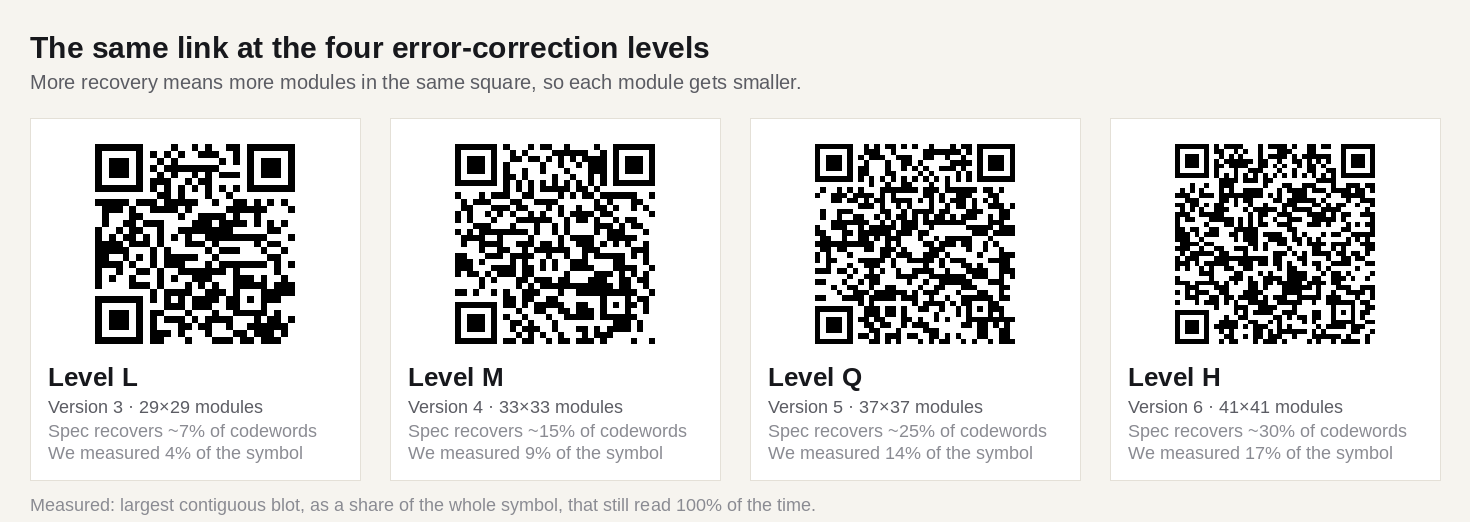
This is the trade nobody mentions. If the code has a fixed physical size — a 20 mm square on a business card, say — then choosing H does not make it tougher in any simple sense. It buys redundancy and pays for it with smaller modules, and small modules are harder for a camera to resolve. On a card read from 20 cm that is usually a bad bargain. On a shipping carton that will be scuffed, it is a good one.
The rule that falls out of this: raise the level when the code will be damaged, raise the size when the code will be far away. They are different problems.
What we measured
We built a small test bench for this site. A version 5 symbol (37×37 modules) carrying a 33-byte URL was generated at each of the four levels, so all four codes are exactly the same size and only the redundancy differs. We then damaged them in two ways and asked a decoder to read them back — 80 attempts per data point, roughly 12,000 decodes in total.
The first damage model is a blot: one white rectangle, dropped at a random position over the data area. A price sticker, a thumb, a scrape.
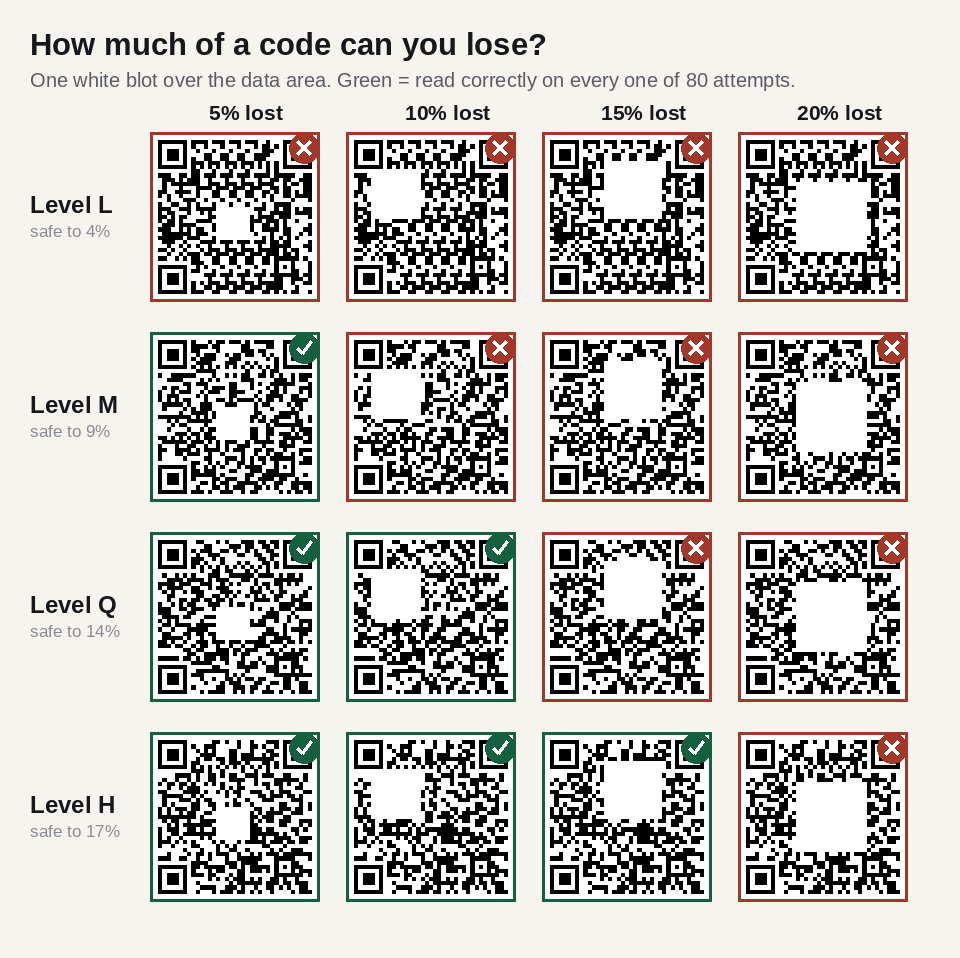
Those figures are lower than the 7 / 15 / 25 / 30 headline numbers, and they should be: a blot covering 17% of the whole symbol destroys a larger share of the data region, because roughly a fifth of the symbol is taken up by function patterns that carry no payload at all.
Scattered damage is the real killer
The second model spreads the same total area of damage over the whole code as individual flipped modules — the pattern you get from a streaky printer, ink spatter, dust, or a fabric weave.
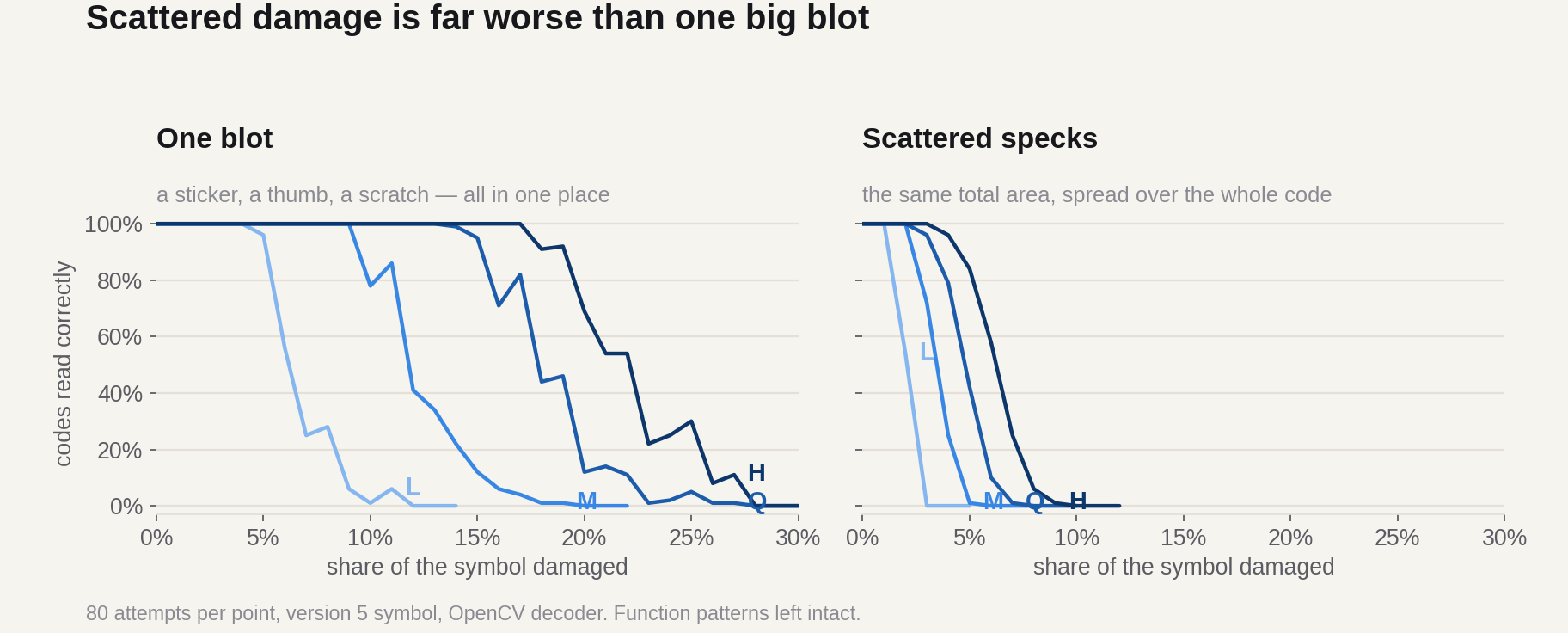
| Level | Blot survived | Scatter survived | Ratio |
|---|---|---|---|
| L | 4% | 1% | 4× |
| M | 9% | 2% | 4.5× |
| Q | 14% | 2% | 7× |
| H | 17% | 3% | 5.7× |
Concentrated damage is between four and seven times more survivable than the same area scattered. The reason is structural. Reed–Solomon correction works on codewords, and a codeword is ruined by one bad module just as thoroughly as by eight. A blot destroys a handful of codewords completely and leaves the rest untouched. The same number of modules sprinkled across the symbol spoils a different codeword almost every time, so the error budget is spent many times faster.
This also explains a failure that puzzles people: a code that scanned perfectly from the screen, printed on a cheap inkjet onto absorbent paper, and stopped working. Nothing dramatic happened to it. Ink bleed nibbled a fraction of a module off thousands of edges at once, which is the scattered case, and the scattered case is where the error budget disappears.
The parts no level can repair
Error correction protects the data region. It does not protect the machinery that lets a scanner find and read the grid in the first place — and that machinery has, in our tests, essentially zero tolerance.
- Finder patterns. Covering a single module of the top-left finder made the code unreadable at every level, L through H. That is 0.07% of the symbol area.
- Timing patterns. The alternating row and column that set the grid spacing. One missing module was again fatal at every level.
- Format information. Stored twice, in two places, precisely because it is critical: it tells the scanner which error-correction level and mask were used. Lose both copies and nothing else matters.
So the useful mental model is not "H codes survive 30% damage". It is: the middle of the code is forgiving and the edges are not. If you are going to punch a hole, trim a corner or overlap a code with anything, the safe place is the centre — which is exactly why centre logos work and corner crops do not. See the anatomy of a QR code for what each of those regions is doing.
Choosing a level
Three questions get you there.
- Will anything sit on top of the code? A centre logo, a die-cut, a fold. If yes, Q or H. A logo should never cover more than about 10% of the symbol, and even then only in the middle.
- Will the surface be abused? Packaging, outdoor signage, workwear, anything printed on textured or absorbent material. H.
- Is the code going to be small, or the payload long? Then L or M, and put the effort into shortening the URL instead. A short link at level M in a 25×25 grid beats a long link at level H in a 45×45 grid at the same physical width, every time.
If you are not sure: M. It is the default in most generators for a reason, and the measured gap between M and Q only starts to pay off once the code is genuinely at risk.
Everything on this site is generated at the level you choose, in your browser, and stays valid forever because the data is inside the image rather than on a server. If you want the reasoning behind that, see static versus dynamic QR codes.
Written by Manuel Llovet, who builds and maintains QR Code Free Forever. Published 2026-08-31, last checked 2026-09-08. Figures and measurements on this page were produced for this site; the method is described in each caption.