PNG vs SVG QR Codes
A PNG is a photograph of your code. An SVG is the instructions for drawing it. That one difference decides which file belongs where, and it is the most common round-trip in any print job involving a QR code.
The short answer
- Going on a screen? PNG. Websites, slides, email signatures, social posts, digital menus, anything displayed at a size you control.
- Going to a printer? SVG or PDF. Business cards, menus, packaging, signage, anything a professional printer touches.
- Not sure? Download both. Neither costs anything and neither expires.
Why it matters on paper
A PNG stores a fixed grid of pixels. Enlarge it and there is no extra detail available, so the software interpolates — invents plausible intermediate values — and the module edges go soft. Soft edges are precisely the thing a scanner has trouble with, because the whole decoding process starts by deciding, for each sampled point, whether it is dark or light.
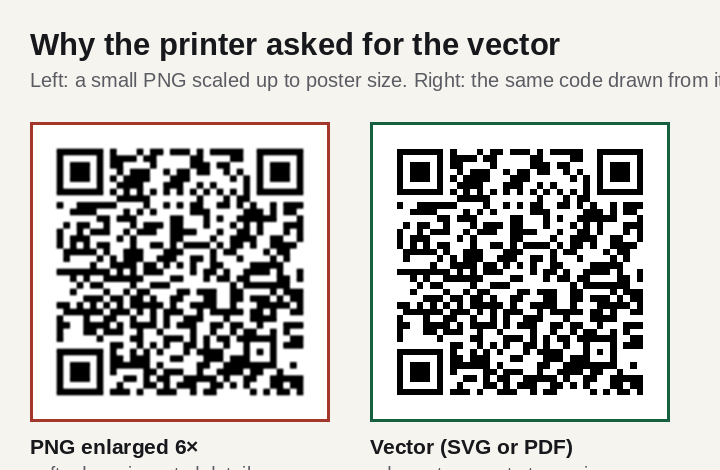
An SVG stores the shapes: a list of rectangles with exact coordinates. Print it at 2 cm or paint it on the side of a building and the edges stay perfectly crisp, because they are recalculated at whatever size is asked for.
There is a second, quieter advantage. A vector code is a handful of kilobytes regardless of the printed size, so it does not slow a layout file down and cannot be accidentally downsampled by an export preset.
The other formats you may be asked for
| Format | Type | Use it for | Watch out for |
|---|---|---|---|
| SVG | Vector | Web, and most modern print workflows | Very old RIPs may not accept it |
| Vector | What most print shops prefer to receive | Make sure the code stays vector on export | |
| EPS | Vector | Older print workflows that ask for it | Being asked for it is a sign of an old setup |
| PNG | Raster | Screens, and print if generated at final size | Never enlarge afterwards |
| JPEG | Raster | Nothing | Compression artefacts on every edge |
| 3MF / STL | 3D mesh | Printing the code as an object | See the 3D printing guide |
If a designer asks for "the vector", they mean the SVG or the PDF. Sending a PNG and being asked again is the single most common round-trip in QR print jobs, and it usually costs a day.
Why never JPEG
JPEG compresses by discarding high-frequency detail — the fine, abrupt changes the eye is least sensitive to in a photograph. A QR code is nothing but abrupt changes. The result is ringing and haloing around every module boundary, worst exactly where contrast is highest, which is everywhere.
Curiously, our own testing found that decoders cope with heavy JPEG compression better than expected: a code at five pixels per module still read at quality 10. But that is a controlled test on a clean image, and it measures the wrong thing — in the real world the JPEG artefacts arrive on top of every other imperfection, and they arrive for no benefit at all, since a QR code as PNG is smaller than the same code as JPEG anyway.
Sizing a PNG properly
If a bitmap is unavoidable, generate it at the size it will be used. Width in pixels equals millimetres divided by 25.4, times the output resolution.
| Printed width | At 300 dpi | At 600 dpi |
|---|---|---|
| 20 mm | 236 px | 472 px |
| 30 mm | 354 px | 709 px |
| 50 mm | 591 px | 1,181 px |
| 100 mm | 1,181 px | 2,362 px |
For screens, the constraint is different: aim for at least five device pixels per module, which our resolution tests found to be the floor for reliable decoding. On a high-density display that means exporting at twice the CSS size. The measurements are in how small a QR code can be.
Written by Manuel Llovet, who builds and maintains QR Code Free Forever. Published 2026-08-31, last checked 2026-09-08. Figures and measurements on this page were produced for this site; the method is described in each caption.